Most social media tools solve one part of the problem.
A scheduling tool gets your posts out on time. An AI writing tool generates the copy. An image generator handles visuals. An approval workflow keeps the team aligned. The problem is that each one works in isolation, when the actual workflow spans all of them — and the handoffs between tools are where time, quality and momentum get lost.
This is not just a minor inconvenience. It is the reason social media execution feels heavier than it should. Every export, every upload, every “did you see the brief I sent?” message is friction. Individually each piece is small enough to feel insignificant, until you see the way it compounds across every piece of content, every week, for every person on the team.
Zirora Pulse is built around the idea that the content workflow should live in one place, from the first draft to the published post. It has four core features: AI Content, AI Images, Post Scheduling and Post Approval. Each addresses a distinct step, but they are designed to connect so that the output from one feeds directly into the next without anyone having to carry it manually.

AI Content: brief to draft
The starting point for most posts is a blank page, a deadline, and a demand to turn the former into post-worthy content by the time the latter arrives. Even with an abundance of things to say, that gap between knowing what you want to communicate and having copy that is actually ready to post is where time disappears.
The AI Content feature closes that gap. You describe what you need: the topic, the platform, the tone, the angle. Pulse then generates ready-to-use post copy from that description.
It handles format differences between platforms automatically, because a LinkedIn post and a tweet are not the same piece of writing even when they are making the same point. A LinkedIn post has room to build an argument over several paragraphs; a tweet has to land in 280 characters. The manual rewrites for each platform are a time-consuming, repetitive bottleneck, made more painful by the reality that many teams produce content for multiple channels several times a week.
But the most important part is that the output is a starting point, not a finished product. The copy comes out structured and on-brand, but your team still shapes it. The AI handles the volume; the human handles the voice. The philosophy of Pulse is not to hand all creative control to a machine, but to make sure teams are never starting from scratch every single time.
AI Images: matching visuals
A post with a relevant visual consistently outperforms one with a generic stock image or no image at all. This is not a new insight. The problem is that sourcing a good visual has historically meant paying for a shoot, spending time on a stock photo site, or settling for something that does not quite fit the post it is attached to.
AI Images generates content-relevant visuals directly inside Pulse. Not a library of pre-made options, but images created to match what the specific post is saying. The feature includes style customisation so the output aligns with your brand aesthetic rather than looking like it came from somewhere else, and it covers a range of industries and content types.
Critically, it sits inside the same workflow as the copy. The image does not need to be sourced separately, dropped into a different tool, resized, exported and then uploaded somewhere. Draft and visuals come together in one place before anything is scheduled. For teams producing high volumes of content across multiple channels, that compression of steps has a real effect on turnaround time.
Post Scheduling: consistent & on time
Creating content is one problem. Getting it out consistently, across platforms, at the times your audience is actually active, is another.
The Post Scheduling feature handles distribution. You set the schedule; Pulse handles publishing across channels. Manually coordinating posting times can easily accumulate into hours across a week, especially for teams whose markets are scattered across the world, each with its own timezone that needs to be factored in and planned around.
Pulse users report saving more than 10 hours per week on scheduling and distribution alone, and engagement improves by around 40% when content goes out consistently at the right times rather than sporadically.
The time saving and the consistency improvement are interconnected: you cannot sustain the second without solving the first. The scheduling workflow is designed for teams of any size, from a solo founder managing their own presence to a content team coordinating multiple brand accounts across platforms.
See it live at zirorapulse.comPost Approval: the right people in the loop
For teams, the moment content goes off-brand is almost always the moment it goes out without the right person seeing it first. Even the most diligent teams have busy weeks that lead them to miss things. And if the review step itself is informal, mostly in Slack or not built into the process in a way that sticks, it will always be a challenge for both logistics and quality control.
The Post Approval feature builds that review step into the workflow structurally, before anything is published. Content moves through an approval queue. Reviewers can approve, request changes, or flag issues. The status of every piece of content is visible to everyone involved, which removes the parallel conversations that usually run alongside the tools: the Slack thread asking whether something was approved, the email chasing a response, the assumption that silence means yes.
It also answers the objection that surfaces with any automation tool: that moving fast means losing control. With approval built into the workflow rather than bolted on as an afterthought, speed and oversight are not in competition. The content moves quickly through the pipeline, and the right people still see it before it goes live.
How it fits together
The workflow looks like this: AI Content produces the draft. AI Images produces the visual. Post Scheduling queues it for the right time and platform. Post Approval routes it through the right reviewer before it publishes.
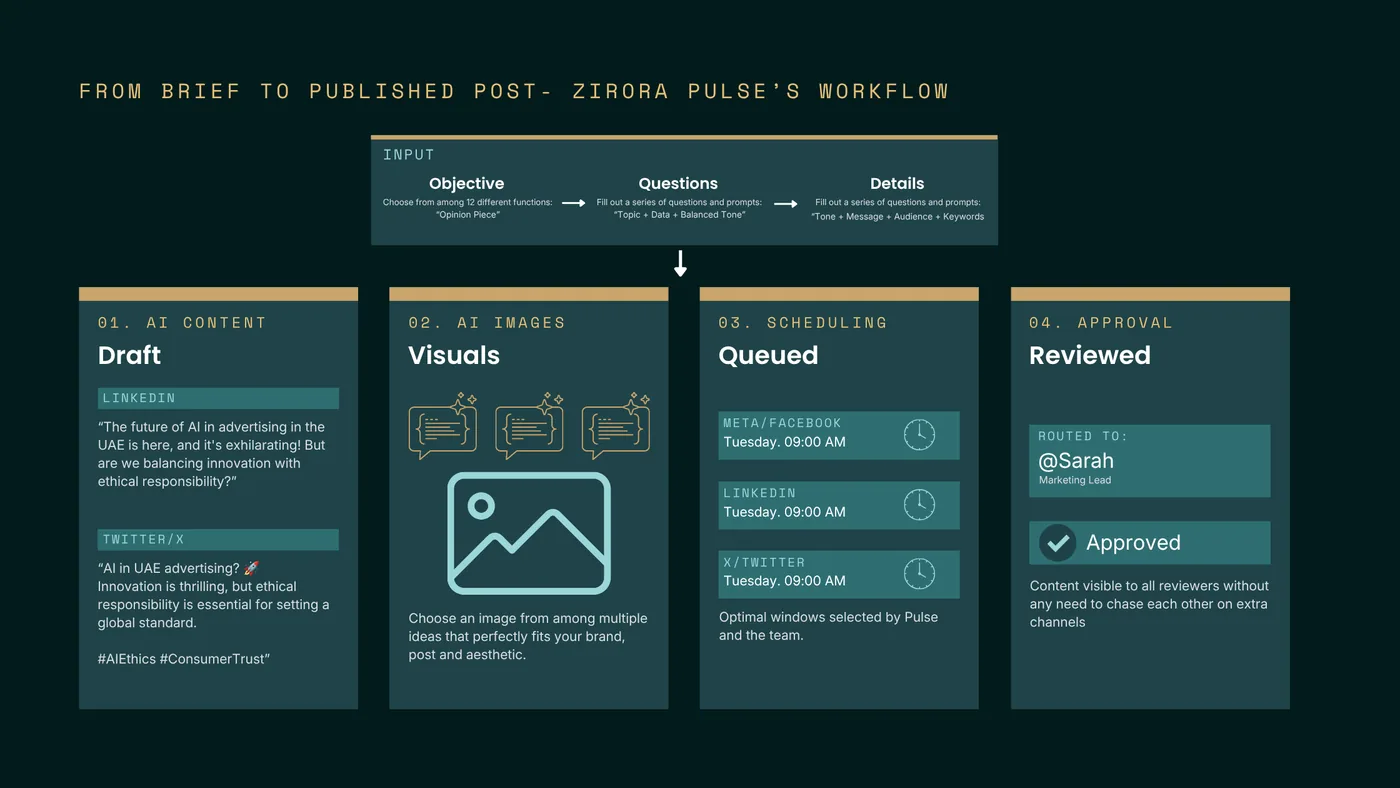
Each feature works independently. But the reason they are all built into one platform is that the handoffs between tools are an expensive part of content production. Every time work moves between applications, someone has to coordinate the transfer, context gets lost, and the whole thing slows down. Keeping the loop inside Pulse means less coordination overhead, a cleaner audit trail, and a team that can move from brief to published post without switching between half a dozen applications to get there.
Zirora Pulse is live at zirorapulse.com. If you want to see how it fits your team’s workflow, get in touch.